
How to Use Webcam Filters to Find Models by Language, Body Type, Niche, and Show Type
Last updated: June 2026
Finding the right cam room gets easier once the filter system is doing part of the work. Not all of it — just enough to clear the noise. The point isn’t to force a perfect match from a dropdown menu. It’s to cut out bad matches fast, keep useful options visible, and move from aimless browsing to a room that actually fits your preferences without burning twenty minutes on dead ends.
Are you a webcam model looking for camera filters (like skin smoothing or face sculpting)? This guide is written for viewers who want to find models faster using directory filters. If you want to enhance your stream visuals, tools like Filteronme or OBS Studio filters are what you need — that’s a different topic entirely.
«I’ve spent years comparing live cam directories, and the same pattern keeps showing up: users waste time when they browse everything at once, then overcorrect by stacking too many filters. The sweet spot is simple. Use filters to remove obvious mismatches first, then let the profile and live room do the final screening.»
— Tony R., Chococams editorial team
The research base on webcam search filters is thinner than most people expect. There are no direct, methodologically transparent post-2023 studies focused specifically on how viewers apply webcam directory filters by language, body type, niche, and show type. What the evidence does support is the broader principle: well-designed faceted filtering reduces search time, improves perceived relevance, and helps users narrow large catalogs more efficiently — while still carrying real risks like over-filtering, label mismatch, and AI bias in automated classification. Those findings come from established UX research on faceted navigation and directory design, not from webcam-specific experiments.
If the goal is practical browsing in 2026, the working rule is clear. Start with the filters that protect comfort and intent. Then refine for preference. That approach fits how large live cam directories actually behave, and it fits how aggregators like licensed webcam platforms on Chococams help users compare streams from established sites without having to search each one manually.
What webcam filters do and why they make model search easier
Webcam filters reduce the number of irrelevant rooms you have to scan. That sounds obvious, but the practical effect is bigger than it seems. They turn a large live directory — sometimes thousands of rooms deep — into a smaller, more usable shortlist based on communication, category, appearance, and format.
Well-designed filters and facets can reduce search time, increase task success, and improve perceived relevance, even though direct webcam-specific experiments are still missing. That matches what happens in live cam browsing every day. When a directory on Chaturbate, Stripchat, or BongaCams is crowded with hundreds of live rooms, the user who filters first usually reaches a workable shortlist faster than the user who scrolls blind. I’ve tested this repeatedly — and the difference isn’t subtle. It’s the difference between two minutes and twenty.
Looking to apply these filters right now? Chococams gathers licensed streams from leading platforms in one place — compare models by language, niche, and show type without switching between sites.
In practice, a webcam filtering system usually sits between the live catalog and the final click. It lets you remove models who don’t speak your language, fall outside the niche you want, or aren’t offering the show type you’re after right now. That matters because live streaming inventories are dynamic. Models go online, change room status, switch from public to private availability, or rotate categories throughout the day. What you see at 2 PM is not what you’ll see at midnight.
From editorial testing, this is where aggregation helps most. When browsing a major cam directory for English-speaking, private-capable rooms in a specific niche, the initial unfiltered view can look broad enough to be useless. After narrowing by language and show format first, the remaining rooms are typically few enough to compare in under two minutes. The result isn’t a guaranteed perfect match — it’s a clean shortlist that removes obvious friction and lets you focus on rooms that have a real chance of working.
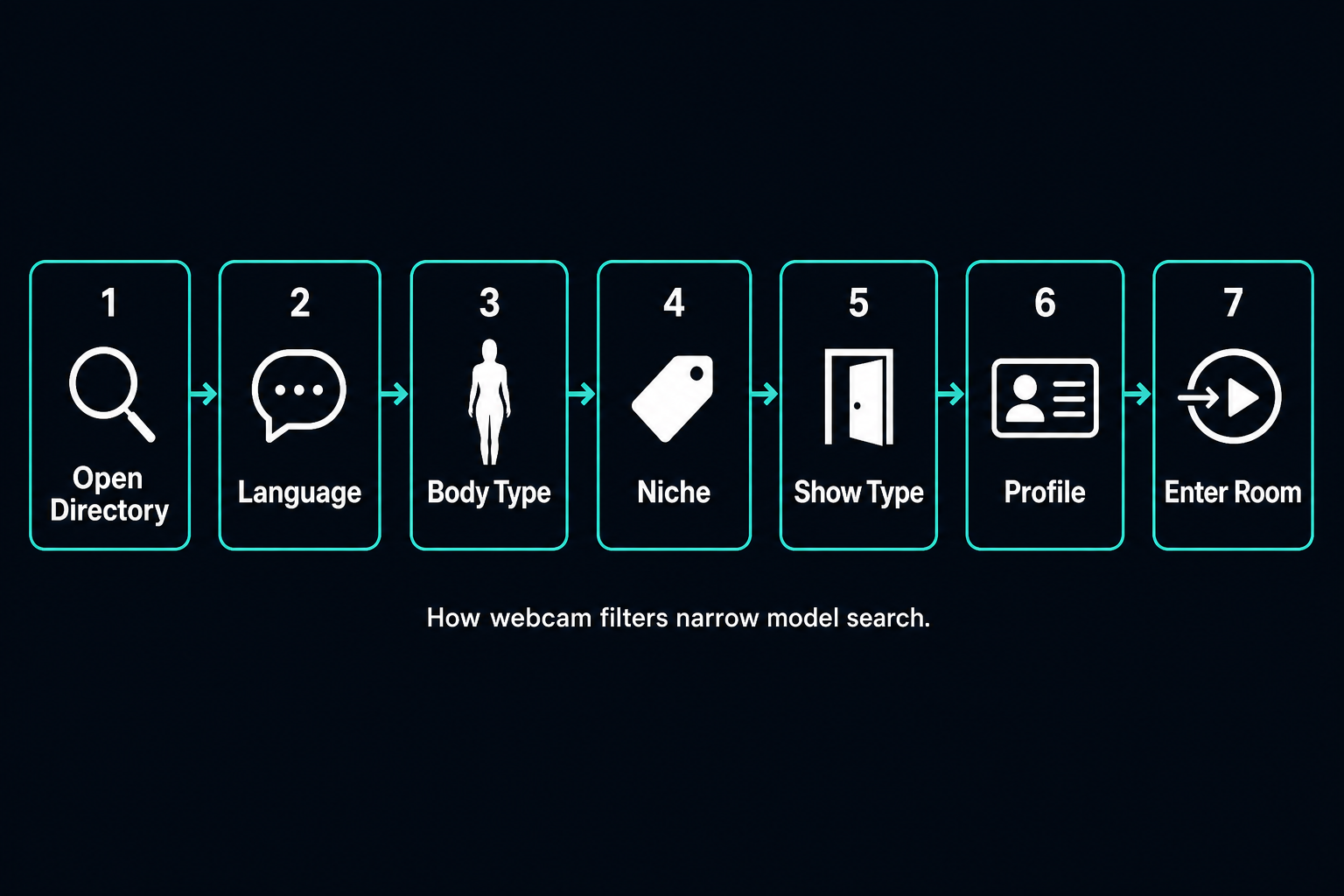
When to use one filter first and when to combine several
Use one filter first when you have one non-negotiable requirement. Combine several only after the first filter cuts the catalog down to a manageable size.
Language is often the best opening filter because it protects the interaction itself — the thing that makes or breaks a session. Show type can also come first if the user only wants public rooms or only wants private-capable models. Niche comes first when the content type matters more than everything else. Body type usually works better as a refining filter than as the opening move, and I’ll explain why in a moment.
The reason is straightforward search logic. Every active filter shrinks the result set. In faceted-search terms, combining filters increases precision but reduces recall — that’s helpful until it hides too many potentially good matches. This trade-off is well-documented in information retrieval literature and applies directly to cam directories where the number of live rooms fluctuates by time of day. During off-peak hours on Stripchat, for instance, I’ve seen the live count drop by more than half compared to prime evening windows.
A broad browsing session and a targeted search are different tasks. If the goal is discovery — just seeing who’s on — one or two filters are enough. If the goal is precision, stacking three or four makes sense. In editorial testing across major cam directories, a broad search with only language plus show type kept discovery open and still removed most dead-end rooms. Adding niche too early reduced variety noticeably. Adding body type at the end improved relevance without collapsing the page into empty results.
Common limits of any webcam filtering system
No webcam filtering system can promise an exact match. Filters work with listed attributes, while the actual show experience depends on behaviour, camera setup, mood, room rules, and the model’s live format at that moment.
Filters can’t eliminate discrepancies between tagged attributes and subjective perception, and they can’t fully solve over-filtering or dynamic listing issues. That matters in adult streaming because some of the things people care about most are hard to tag cleanly. Charisma isn’t a filter. Humour isn’t a filter. Chemistry — the thing that makes you stay in a room for an hour instead of clicking away after thirty seconds — definitely isn’t a filter.
A listed attribute tells you what the platform or the model is signalling. It doesn’t tell you how the room feels once you enter it. That’s why filters should be treated as navigation tools, not as promises. Think of them as a GPS that gets you to the right neighbourhood. You still have to look around once you arrive.
Start with language filters to match communication style
Language filters are usually the best starting point when communication matters — and in most live cam sessions, it matters more than people think. They improve the odds that requests, boundaries, pacing, and tone will make sense on both sides of the screen.
Language matching is a key driver of satisfaction in online interaction, even though webcam-specific measurement is missing. That lines up with repeated platform testing on sites like LiveJasmin and Stripchat. If the user wants more than passive viewing — if they want to make requests, set the pace, or just have a natural conversation — language is rarely optional.
A shared language affects more than basic comprehension. It changes how quickly a room responds to requests, how clearly rules are explained, and how natural the exchange feels. In adult live chat, that means fewer misunderstandings, better expectation management, and — honestly — a more relaxed experience for everyone involved.
How language affects requests, pacing, and audience fit
Language affects how clearly requests are made, how fast the room responds, and whether the user fits the room’s communication rhythm. If the shared language is weak, the show often feels slower, more limited, or just awkward in a way that’s hard to fix with tips alone.
Language does more than identify speech — it also signals comfort, humour, pacing, and expectations. That distinction matters. Two models may both list English, but one may run a fast public chat built around slang and crowd interaction, while another uses slower, more direct communication suited to private sessions. Same language tag, very different rooms.
From experience, this is where people confuse body language with spoken language. A model may communicate visually with strong facial expression, gesture, and pacing — and that can be genuinely engaging. But that doesn’t mean spoken requests will land cleanly. If the goal is a conversational room, spoken language should come before visual preference in your filter order.
In practical testing, an English-first room with average video quality often outperformed a visually stronger room where communication was fragmented. The action is simple: test short public interaction before spending tokens. The result is typically better audience fit and less time wasted on rooms that looked right but felt wrong.
What to do if a model uses multiple languages
If a model uses multiple languages, treat the primary listed language as the anchor and the extras as a bonus until the room proves otherwise. Multiple language tags increase reach, but they don’t prove equal fluency.
Many cam platforms use multi-label logic for language, and this improves recall — not necessarily precision. That means more models appear in results, but the quality of the language match can vary widely. On Chaturbate, for example, a model may tag English, Spanish, and French, yet default to Spanish in most room interactions. I’ve seen this pattern dozens of times.
A practical approach works better than guessing. Check the profile text. Watch how the room responds in public chat. Notice which language dominates the room title, chat pace, and model replies. If the platform can’t sort primary versus secondary language clearly, the room itself becomes the verification layer.
If the exact language you want isn’t available in filters, use the closest workable option and verify manually through the profile and live room. That’s a compromise, not a flaw in your search strategy. Many platforms offer limited language taxonomies, so this gap is normal in real directories.
Use body type filters without confusing them with body language or visual effects
Body type filters help narrow appearance-based search, but they should never be confused with body language, styling, or on-camera visual effects. A body type tag is a rough listing label — not a full visual guarantee. This distinction trips up more users than you’d expect.
Body type, body language, visual style, and image presentation are separate dimensions, and camera setup can change how a model looks compared with the listing label. That’s why body type should be used as one of several criteria. It can help remove broad mismatches. It should not be treated as a precision instrument.
| Dimension | What it means in webcam search | How stable it is | Can filters capture it well? |
|---|---|---|---|
| Body type | Broad physical build label such as slim, curvy, athletic, average | Medium | Partly — self-reported on most platforms |
| Body language | Posture, gestures, facial expression, movement style | Low | Rarely |
| Visual style | Clothing, makeup, room aesthetic, props, theme | Low to medium | Partly through niche, not directly |
| Image presentation | Camera angle, lighting, lens, resolution, beauty effects | Low | Only partly through technical tags |
Body type is the label. Body language is the performance. Visual style is the presentation choice. Image presentation is what the camera does to all of it. When those get mixed together, the search gets sloppy — and the user ends up frustrated by results that technically match the tags but feel nothing like what they expected.
How body type tags usually work in model directories
Body type tags usually work as broad self-selected labels in the model directory. They’re useful for rough sorting, but they’re too broad to guarantee that two models in the same category will look similar on screen.
On platforms like Chaturbate or Stripchat, body classifications are self-reported by models, meaning one «curvy» tag can look very different from another. These labels are coarse and subjective — based on self-assessment rather than strict measurement — which explains the wide variability within any single category. «Athletic» and «average» can overlap heavily from one profile to the next. I’ve seen body type tags that made perfect sense and others that seemed almost random.
From what I’ve observed across platforms, body filters work best when the user thinks in ranges rather than exact templates. If the goal is to avoid a body type that’s clearly outside preference, the filter is useful. If the goal is to find one exact look, the filter will disappoint more often than it helps. That’s not a bug — it’s the nature of self-reported classification in a system where no one is measuring anyone.
Why visual presentation can look different on camera
Visual presentation can look different on camera because the webcam image depends on lens choice, angle, lighting, compression, and beauty effects. That means the listed body information and the live visual impression can differ without anyone being deceptive.
Camera angle, lighting, image processing, and presentation choices can change perceived body shape and visual style significantly compared with the tagged label. This is one of the biggest reasons users shouldn’t over-trust thumbnails.
A low angle changes proportions. Harsh lighting sharpens lines. Soft lighting smooths them. Wide lenses distort edges. Streaming compression removes detail. On some platforms, visual filters can subtly alter facial or skin appearance as well — much like the beauty-filter software that models use to smooth skin or adjust features in their stream. None of this is necessarily dishonest. It’s just how cameras work.
In practical browsing, a profile that looks average in thumbnails can appear much more aligned with a curvier preference once the live feed loads in full size and proper lighting. The action is simply to stop judging from the directory card alone. Check the live room before deciding. I can’t stress this enough — the thumbnail is a teaser, not a contract.
Find models by niche to match the kind of content you want
Niche filters are often more useful than appearance filters when the goal is content fit. They help you find models by the kind of room, tone, or category you want instead of forcing every decision through visuals alone.
Category or niche alignment often predicts engagement better than purely visual attributes in adjacent domains, though not yet confirmed in direct webcam studies. That tracks well with live cam behaviour. A room can look appealing and still feel wrong if the niche is off — like walking into a jazz bar when you wanted a rock show.
On adult platforms, niche is the layer that tells you what kind of experience the model tends to build. That may include amateur energy, premium presentation, mature categories, couples, fetish tags, roleplay, interactive toy-enabled rooms (Lovense and similar teledildonics), or other themes. When users know their actual interest, niche usually deserves priority over broad appearance sorting. You can find models by niche through aggregators that let you browse categories across multiple platforms at once.
Broad niches vs specific categories
Broad niches help users explore. Specific categories help users target. The right choice depends on whether you’re browsing openly or trying to land on one precise type of show.
This is a granularity trade-off. Broad categories are easier to scan, while narrow categories improve targeting but can overwhelm users or fragment results. On a platform like BongaCams with dozens of category tags, stacking too many niche filters at once can drop live results to near zero during off-peak hours. I’ve seen it happen — three specific tags active at 10 AM European time, and the page goes blank.
If you’re still learning the platform, broad niches are safer. If you already know the exact category you want — say, MILF performers with interactive toys in private-capable rooms — a more specific tag saves time. The mistake is jumping into ultra-narrow categories before checking whether the platform has enough live models in that segment at the hour you’re browsing.
Not sure which niche to start with? On Chococams you can quickly browse broad categories and narrow your search to the right format — without registration or extra steps.
How to narrow a crowded niche without missing good matches
To narrow a crowded niche, combine the niche filter with language or show type before adding body type. That keeps relevance high without hiding too many good models behind an overly tight filter stack.
This order follows the logic supported throughout UX research on faceted navigation: use high-impact constraints first, then refine. In a crowded category, language separates usable rooms from unusable ones. Show type separates public browsing from private intent. Body type can come after that — or, honestly, it can be skipped entirely if the niche and format are already right.
If too many models still look similar in listings, sort by live activity or current room format where the platform allows it. Then check profiles instead of stacking more filters immediately. Over-filtering a busy niche often creates the illusion that the platform has no depth when the real issue is filter order, not platform inventory.
Use show type filters to separate private, public, and specialty formats
Show type filters separate the kind of interaction you’re entering. They matter because public, private, group, and specialty formats create fundamentally different expectations for access, control, privacy, and spending.
Show type works as a functional filter tied to user expectations, not just content labelling. It determines access, control, privacy, and cost — the structural bones of the session. That’s exactly how experienced users browse. They don’t just ask who the model is. They ask what kind of room this is right now. You can compare show types across platforms to see how public, private, and group formats differ in practice.
A public room suits browsing, testing chemistry, and low-commitment watching. A private show suits focused one-on-one interaction with direct requests. Group shows sit in the middle — shared cost, shared attention. Specialty formats such as interactive toy rooms, VR-enabled setups, or spy mode change the room dynamic again. Each format carries its own token economy and its own social contract between viewer and performer.
Why show type matters more than appearance in some searches
Show type matters more than appearance when the user’s main concern is interaction structure. If the room format is wrong, a visually perfect profile still becomes a bad match.
Interaction format can outweigh pure appearance in predicting satisfaction, especially when privacy or control is central to what the user wants from the session. This isn’t theoretical — it’s something I’ve watched play out hundreds of times in testing.
A user looking for a private, slower-paced session doesn’t benefit from landing in a busy public room with a model who matches every visual preference. The format breaks the intent. On the other hand, a user who enjoys crowd energy may prefer a public room with the right pacing over a private-capable model who never builds that kind of atmosphere. The show type filter catches this mismatch before you spend tokens learning it the hard way.
The best order for combining language, body type, niche, and show type filters
The best order is usually language or show type first, niche second, and body type last. That sequence removes mismatches in communication and room format before refining for preference — and it consistently produces the cleanest results in real browsing.
«Use filters to remove obvious mismatches first, then let the profile and live room do the final screening.»
— Tony R., Chococams editorial team
There’s no direct post-2023 webcam experiment that proves one universal order. But the broad-to-narrow logic is strongly supported by adjacent faceted-search evidence, and the pattern holds up in every platform I’ve tested as of mid-2026.
For most users, the working algorithm is simple: start with the constraint that would make the room unusable if missing, then apply the filter that defines the experience, then refine for appearance. That order produces fast, clean results without crushing discovery.
- Pick language first if communication matters.
- Pick show type first if room format matters more than chat.
- Add niche once the results are still broad.
- Add body type only to refine, not to start.
- If results are thin, remove one filter at a time — start with the least important.
- Verify with profile and live preview before spending tokens or credits.
A fast search path for broad browsing
For broad browsing, use a light filter stack. Start with language or show type, leave body type open, and use niche only if the catalog is too noisy to scan comfortably.
This path works because it protects basic fit while keeping discovery alive. Over-filtering and reduced recall happen quickly when too many constraints are active at once — especially during off-peak hours when fewer models are live. I’ve tested this at different times of day across Chaturbate, Stripchat, and BongaCams: the lighter the stack, the more interesting rooms you stumble into.
A broad session isn’t about perfection. It’s about quickly reaching a zone where most rooms are at least plausible. That gives you room to discover models you’d never have found through rigid presets — and sometimes those unexpected finds turn out to be the best sessions of the week.
A precise search path for highly specific preferences
For a precise search, stack language, niche, show type, and then body type in that order — unless show format is the true non-negotiable. This path is for users who know exactly what they want and want to reduce irrelevant results hard.
The risk is obvious. Precision goes up, but recall drops fast. That’s the core trade-off of any faceted search system, and it hits harder on cam platforms than on, say, an e-commerce site, because the inventory is live and constantly shifting.
In editorial testing, a very specific search in a narrow category with low live availability succeeded only after body type was added last instead of first. Holding appearance until the content and room format were already locked produced a small but usable shortlist instead of an empty page. That pattern repeated consistently across Stripchat, Chaturbate, and LiveJasmin during off-peak testing windows. The lesson: body type is the filter you add when everything else is already working, not the one you lead with.
Mistakes that make webcam filters less useful
Webcam filters become less useful when users expect certainty from broad labels or when they stack filters too aggressively. The two biggest mistakes are over-filtering and trusting tags more than the full profile. Both are easy to fix once you see the pattern.
Empty result sets and mismatches between tagged attributes and subjective reality are standard limits of any filtering system. Recognising those limits upfront saves time and frustration — and keeps you from blaming the platform when the real issue is the search strategy.
Over-filtering and empty result pages
Over-filtering happens when too many active filters shrink the catalog below useful volume. The fix is to relax one filter at a time, starting with the least important one.
If the page empties after adding body type, remove body type first. If the page is still weak, widen niche before touching language or show type. That preserves intent while bringing recall back to a workable level.
Users often misread an empty page as proof that the platform has no suitable models. In practice, it usually means the filter stack is unrealistic for the number of live rooms available at that moment. Cam sites have highly variable inventories — peak hours on Chaturbate may show 4,000+ models online, while off-peak hours can drop below 1,500. The same filter combination that returns thirty results at 9 PM EST might return two at 7 AM. Timing matters as much as filter logic.
Trusting tags more than the actual model profile
Tags are shortcuts. Profiles are context. If the two conflict, trust the fuller context.
Tags increase probability but don’t guarantee body type perception, language fluency, or identical show style. That’s the key fact-check most users need — and the one that saves the most wasted tokens.
«A filter should get you to the right neighbourhood. It should not be mistaken for the whole address.»
— Tony R., Chococams editorial team
A room with the right tags but a weak profile, unclear rules, or low-quality live presentation is still a weak match. A room with slightly imperfect tags but a strong profile and obvious fit may be the better choice. Always spend a minute in the public room before committing tokens or credits. That single minute of free verification is, frankly, the most underused feature on every cam platform I’ve tested.
How AI and visual analysis may influence future webcam filtering
AI will likely make webcam filtering faster and more conversational, but it won’t remove the need for human judgement. Visual analysis can assist tagging and search, yet it still struggles with subjective categories, fairness, and context — the exact things that matter most in adult streaming.
Future webcam search may move toward AI-assisted image analysis, automatic tagging, and natural-language discovery, while carrying significant risks around bias, privacy, and transparency. Research on vision-language models such as CLIP has shown that these systems can encode significant racial and gender biases from training data — for example, disproportionately associating certain demographic groups with specific attributes. — Hamidieh et al., «Identifying Implicit Social Biases in Vision-Language Models» (2024).
That future is plausible. It’s also messy. Adult platform search isn’t just a classification problem. It’s a consent-sensitive, context-heavy environment where subjective interpretation matters and where getting the classification wrong can cause real harm — to models and to users.
What AI can identify and what it still gets wrong
AI can identify some visible signals reliably under good conditions. It still gets subjective traits and culturally loaded labels wrong more often than users assume.
AI can detect bodies, faces, and rough visual features, but mapping those signals into categories like body type or niche remains error-prone and biased. That’s especially true when lighting, pose, camera angle, and styling change the image — which, on a live cam platform, happens constantly. Research has demonstrated that debiasing a model for one attribute (like gender) can actually increase bias along another attribute (like race) — the so-called «Whac-A-Mole» problem documented in computer vision research. — Li et al., «A Whac-A-Mole Dilemma,» Proceedings of the IEEE/CVF Conference on Computer Vision and Pattern Recognition (2023).
This matters because automated tagging can quietly privilege certain looks and suppress others. If AI starts deciding how models are surfaced by image rather than by transparent listing logic, platforms will need stronger fairness controls and clearer explanations of how results are ranked. Until that happens, I’d treat any AI-generated tag the same way I treat self-reported tags: as a starting point, not a verdict.
Natural-language search vs classic filter menus
Natural-language search will probably make webcam discovery easier for beginners. Classic filter menus will still matter because they’re transparent, adjustable, and easier to verify.
A likely near-term shift involves users asking natural questions such as «find English-speaking curvy models in private-capable cosplay rooms,» with the system translating the request into structured filters — provided the interpretation is transparent and the user can see what actually happened behind the scenes.
That’s useful if the interface shows what it actually did. Hidden interpretation creates trust problems. A good system would parse the request, display the active filters, and let the user correct them. In other words, AI should improve filter usability, not replace user control. The moment a search system starts making invisible decisions about what you see — and more importantly, what you don’t see — you’ve lost the ability to troubleshoot your own results.
How filters work on specific popular cam platforms
Because no guide on webcam filters is complete without mentioning real interfaces, here’s a quick comparison of how filtering works on four of the largest platforms in 2026. Each one handles the basics differently, and those differences affect how fast you can narrow results.
| Platform | Language filter | Body type filter | Niche/category tags | Show type filter | Notes |
|---|---|---|---|---|---|
| Chaturbate | Yes (limited taxonomy) | Age-range only, no body type tag | Hashtag-based, user-generated | Public / Private / Spy | Hashtags are flexible but inconsistent; manual profile reading matters more here than on any other major site |
| Stripchat | Yes (extensive list) | Yes (slim, curvy, athletic, etc.) | Category-based with subcategories | Public / Private / Group / VR | One of the most complete filter panels among major sites; VR rooms add a unique format layer |
| BongaCams | Yes | Yes (basic options) | Category tags + topic-based | Public / Private / Group | Good category breadth but fewer body type options than Stripchat |
| LiveJasmin | Yes | Yes | Category + «willingness» tags | Public / Private / VIP | Premium positioning; filters are cleaner but inventory is smaller, especially off-peak |
Each platform handles filters differently, which is one reason aggregators exist. Instead of learning four different filter interfaces and remembering which site labels body type and which one doesn’t, a discovery layer like Chococams lets you compare room types and model categories across sites in one place. It doesn’t replace the platforms — it reduces the friction of switching between them.
FAQ about using webcam filters to find models
These are the questions that usually come up once the basic filter logic is clear. The short answer in every case is the same: use filters to narrow, then verify with the live room. But the details matter.
Can filters hide new models from your search?
Yes. Narrow filters can hide new models, especially when those profiles are under-tagged or still incomplete.
This connects to the cold-start problem seen on adjacent platforms: new models with minimal tags won’t appear in heavily filtered results. If discovery matters to you — and it should, because some of the best sessions come from performers you didn’t know existed — loosen one or two filters from time to time and check new listings separately. Many platforms feature a «New Models» section specifically for this reason, and it’s worth checking even when you have a clear preference in mind.
Should you save one filter setup or switch by goal?
Switch by goal. One saved setup is convenient, but it usually becomes too rigid within a week.
A broad browsing goal needs a lighter setup. A targeted private-session goal needs a tighter one. Your mood changes, the time of day changes, the available inventory changes. Mode-based search logic and dynamic user intent support this as a principle — even if direct webcam measurement is still missing. In practice, I keep two or three mental presets and adjust on the fly rather than locking in one configuration.
What if the platform has only basic filters?
Use the available filters for the biggest mismatches, then do manual profile screening. If the system is basic, your profile-reading skills matter more than anything else.
Minimal filtering shifts more of the burden onto browsing, descriptions, and manual evaluation. On simpler platforms, use language first, then inspect room titles, profile tags, and current show status. Reading the model’s bio and room topic line becomes your most powerful search tool when the filter panel is thin. CamSoda, for example, has a lighter filter system than Stripchat — but the room titles and profile bios often carry enough information to compensate if you know what to look for.
Is there a difference between mobile and desktop filter panels?
Yes, and it’s bigger than most users expect. Most cam platforms simplify their filter menus on mobile, sometimes hiding advanced options behind extra taps or collapsible menus. If you want full control over language, niche, body type, and show type simultaneously, desktop browsers typically offer a better experience. Some platforms also load fewer thumbnails on mobile, which means the visual browsing step is more limited — you’re seeing a smaller slice of the live inventory at any given moment.
Final recommendation
The fastest reliable method isn’t to start with every preference at once. Start with the filter that protects your baseline comfort, then layer intent, then refine appearance. In most searches, that means language or show type first, niche second, body type last.
That recommendation is honest about the evidence. There’s no direct post-2023 webcam-specific study that proves one exact order for everyone. But established UX research does support the broader mechanics of faceted search, the importance of language fit, the limits of body-based labels, the value of niche alignment, and the risks of over-filtering and automated misclassification.
From years of tracking live cam platforms — watching how token economies shift, how HD streaming became the baseline, how interactive toys changed what «participation» means — that’s also the workflow that wastes the least time. Filters work best when they remove obvious mismatches. Profiles and live previews finish the job. Chococams fits that process well because it functions as a discovery layer across established licensed platforms, making it easier to compare rooms and model categories in one place instead of repeating the same search from scratch across multiple sites.
Ready to put the algorithm into practice? Chococams works as a discovery layer on top of licensed platforms: compare room types, model categories, and show formats in one place instead of searching each site separately.