
How to Find the Right Cam Model: Filters, Tags, Languages, and Show Types Explained
Last updated: June 2026
Finding the right cam model gets dramatically easier once you stop scrolling blindly and start treating discovery as a layered process. The sequence is straightforward: broad filters first, then tags to shape the vibe, language confirmation, and finally a show-type check — all before you commit more than a few seconds to any single room.
Looking for camera beauty filters? If you are a model trying to enhance your video feed with skin smoothing, face sculpting, or AR effects, you need virtual camera software — that is a completely different topic. This guide is for viewers who want to use platform search filters to find the right performer faster and stop burning time on aimless scrolling.
«I’ve spent years tracking how adult users move through cam platforms, and the same pattern keeps surfacing: people waste time when they browse rooms blindly. The fastest way to get a better match is to treat discovery like a shortlist process — not a random scroll.»
— Tony R., Chococams editorial team
From my experience reviewing live cam platforms and aggregator layouts, the problem is rarely a lack of choice. It is almost always too much choice without structure. And that observation lines up with broader discovery research: streaming users spend an average of 12 minutes deciding what to watch, and 67% abandon a platform entirely after 15 minutes if they still have not found a fit. That is a useful benchmark for any content-heavy environment where overload stalls decisions — live cam browsing very much included.
«Streaming users spend an average of 12 minutes choosing content, and 67% leave if they haven’t found a match within 15 minutes.»
— Gracenote Consumer Behavior Analysis (2026)
For adult cam browsing, that means finding the right cam model is not just about appearance. It is about category fit, communication style, room energy, pricing logic, and whether the model’s public room behaviour matches what you actually want from a session. On the live cam aggregator Chococams, the practical advantage is aggregation: instead of jumping across Stripchat, Chaturbate, BongaCams, LiveJasmin, CamSoda, XCams, or SkyPrivate one by one, you can compare active streams, categories, and interaction styles from a single discovery layer. One filter setting — say, MILF + English + Lovense — sifts through five or more platforms simultaneously rather than making you repeat the same search on each site.
Disclaimer: This article reflects editorial experience with adult cam platforms. Feature availability, pricing, interaction rules, and show formats vary by platform and region. Always verify current terms directly on the site you are using.
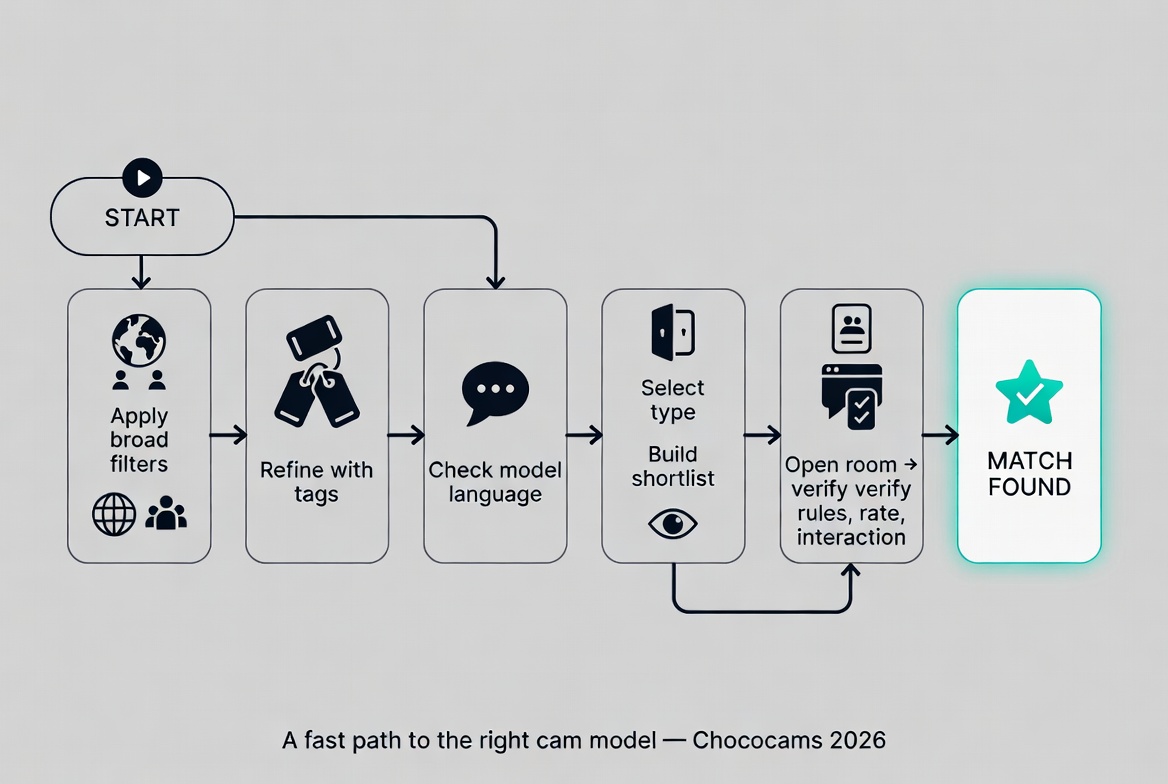
Text version of the flow:
- Start with broad filters.
- Narrow the list with tags.
- Confirm the model’s spoken language.
- Check the available show type.
- Save a shortlist.
- Open the room and verify rules, pricing, and interaction style.
Filters
Broad platform controls — gender, region, show status, platform source — that remove obvious mismatches before you start browsing individual rooms.
Tags
Descriptive labels applied to rooms (e.g., “Lovense,” “cosplay,” “couples”) that signal a room’s vibe, niche, or interactive features. More granular than filters.
Languages
The spoken and written language a model uses in chat. Critical for flirting, negotiation, rule clarity, and consent cues during a session.
Show types
The format of a live session — free public room, private show, group show, spy mode, or premium one-on-one — each with different payment logic and interaction rules.
Model
The live performer broadcasting on a cam platform. “Finding the right model” means matching category, language, show type, and room energy to your preferences.
Tony R. writes on behalf of the Chococams editorial team as an adult streaming analyst and cam platform reviewer with more than a decade of hands-on industry observation, focused on live cam UX, token systems, categories, privacy tools, and platform comparison.
Start with Broad Filters to Remove Obvious Mismatches
The short answer: use discovery tools in layers. UX research consistently shows that users perform better when interfaces provide progressive disclosure and immediate result feedback rather than forcing them into bloated menus or blind browsing. People typically rely on a handful of meaningful filters, and dynamic result counts — the number that updates as you toggle each option — improve task performance by roughly 32%.
«Users perform tasks 32% better when filtering interfaces show dynamic result counts with each selection.»
— ACM Transactions on Computer-Human Interaction (2026)
In cam terms, that translates to a clean workflow. On adult live cam platforms, broad filters usually cover performer category, room activity, platform source, free versus paid emphasis, and sometimes interaction tools like Lovense-enabled rooms or Cam2Cam. Do not start with dozens of niche labels. Start by removing what clearly does not fit. I know it sounds obvious, but I watch users skip this step constantly — they dive straight into tag stacking and wonder why the results feel random.
Common mistake: During one review cycle, a room list looked strong on quantity but weak on relevance because too many users were entering premium rooms when they actually wanted casual free browsing.
Better approach: Rebuild your comparison flow around broad first-pass filters before touching niche tags. Shortlist quality improves because you stop opening rooms that are structurally wrong for your intent.
Here is how this plays out on specific platforms. On Chaturbate, the main filter bar sits across the top of the page and lets you select gender, region, and broad tags instantly. On Stripchat, the left sidebar offers category tiles that function as visual broad filters — you can scan them in seconds. On LiveJasmin, the homepage explicitly separates “Free Chat” rooms from “Private” rooms right on the main navigation, which is genuinely helpful for intent-matching before you click a single thumbnail. Knowing where these controls live saves you from manually scrolling past hundreds of irrelevant rooms.
One thing worth noting: the right cam model on the wrong platform is still a frustrating experience. If you prefer token-based tipping and public room energy, LiveJasmin’s private-first structure might feel restrictive. If you want polished one-on-one attention, Chaturbate’s chaotic public rooms can feel overwhelming. Broad filters are not just about narrowing models — they are about narrowing the environment that suits your browsing style.
Use Tags to Shape the Vibe
Research on tag-aware recommendation systems found a 23.7% accuracy lift over older collaborative approaches because tags capture semantic relationships better than blunt categories. The TRAL algorithm (Tag-Aware Recommendation Algorithm) demonstrated this by modelling how tags relate to each other, not just to individual items. Controlled experiments also confirmed that tag-oriented systems reduce discovery time by 18% to 22% compared to baseline approaches.
«Tag-aware recommendation systems achieve 23.7% higher accuracy by modeling semantic connections between tags.»
— CVPR, TRAL research (2026)
These tags signal room dynamics, not just surface labels:
- Amateur: Usually a softer production style, casual chat pace. Does not necessarily mean lower prices — I have seen amateur-tagged rooms with private rates higher than some studio performers.
- Mature: Age-coded category fit, often with stronger conversation skills. Not automatically a slower room.
- Couples: Two-person dynamic, typically more performative. Viewer control is usually limited — check whether interaction is performer-led or if tip menus offer real input.
- Fetish: Niche interest is relevant, but few rooms are fully specialised. Always read room rules and ask before assuming anything.
- Lovense / Interactive toy: Tip-triggered toy response is available. Quality varies wildly — check the tip menu and watch responsiveness for at least a minute before spending.
- Premium / Private: A paid one-on-one option exists. Does not guarantee good value — compare rate, menu, and boundaries first.
- VR: Room supports virtual reality headsets. Availability and visual quality differ dramatically between platforms and individual setups.
Use two to four tags at most. Stacking fifteen tags usually makes the room list worse, not better, because you over-constrain the results and end up with either zero matches or a handful of rooms that gamed the system by tagging everything.
How to spot tag mismatches: Tags are only as useful as the people applying them. Some models add dozens of popular tags simply for visibility — a practice known as “tag stuffing.” A quick way to verify: look at the tip menu and current room activity. If a room is tagged “Lovense” but you see no interactive toy reactions in the tip history, the tag is weak data. If a room is tagged “fetish” but the public chat looks like standard token tipping with no niche content, the specialisation probably is not there. Treat tags as probability signals, not guarantees. This is one of those things that sounds cynical but saves you real money.
«Tag-based mapping fails when items are inconsistently tagged — a universal problem in any tag-governed system.»
— ServiceNow, tag-governance documentation (2026)
A practical tip I have found useful: when you are comparing rooms across platforms, pay attention to how each site handles tag taxonomy. Chaturbate lets models self-tag almost freely, which means high variety but also high noise. Stripchat curates its category tiles more tightly, so tags there tend to be slightly more reliable — though not immune to the same stuffing problem. On LiveJasmin, categories are more platform-controlled, which reduces noise but also limits how granular your niche search can be. Understanding these differences helps you calibrate how much trust to place in tags on each platform.
Verify Language Before Investing Attention
Multilingual discovery research found that recommendation accuracy drops hard across language barriers — a 38.7% average decline in cross-language performance, especially for less common languages where platforms rely heavily on machine translation.
«Recommendation accuracy drops 38.7% on average across language barriers, especially for lower-resource languages.»
— Scientific Reports, multilingual recommendation meta-analysis (2026)
On cam sites, language is not a small detail. It affects flirting, rule clarity, consent cues, private-show negotiation, and simple comfort. If a room looks perfect but the model mainly speaks a language you do not understand, the session can stall even when the visuals are strong. I have watched this happen more times than I can count — a viewer enters a gorgeous room, tries to engage, gets a scripted “thank you baby” in response, and leaves frustrated within two minutes.
How to check language in 30 seconds: Before committing to a private show or spending tokens, type a specific, conversational question in the public chat — something beyond “hi” or “you’re hot.” Ask about the tip menu or a room rule. If the response is immediate, natural, and in your language, the fit is real. If you get a delayed, copy-paste-style answer or silence, a language barrier likely exists. Adjust your expectations accordingly: a model with limited English may still run a great visual show, but chat-heavy roleplay or detailed negotiation will be difficult.
For English-speaking users, the practical move is to set English first unless you are intentionally seeking a bilingual or non-English room. That avoids dead-end openings where the room looks right but the interaction stalls. If you enjoy Eastern European, Latin American, or multilingual rooms, still check language early — chat style and negotiation cues vary significantly across regions, and what reads as directness in one culture can feel abrupt or confusing in another.
A useful secondary check: see whether the model responds in the same language in both public chat and private setup. Some rooms list English but operate mostly through translated phrases or minimal script responses. That is not automatically bad, but expectations should match reality. If you want detailed roleplay negotiation, boundaries discussion, or chat-heavy intimacy, language fluency matters more than visuals. Full stop.
Confirm the Show Type Before Assuming Anything
Show type is where a lot of browsing mistakes happen. The main formats can look similar on a listing page but behave very differently once you are inside the room.
| Show type | What it is | How payment typically works | Best for |
|---|---|---|---|
| Free public room | Open stream, anyone can watch | Tips/tokens are optional; model earns from voluntary contributions | Casual browsing, model discovery, checking room energy before spending |
| Private show | One-on-one paid session | Per-minute rate set by the model; charges begin when the show starts | Users who already know the room’s tone, rates, and boundaries |
| Group show | Paid show shared among multiple viewers | Each viewer pays a set entry fee or per-minute rate, split across participants | Viewers who want a paid upgrade without full private pricing |
| Spy mode | Watch an ongoing private show without interaction | Flat fee or per-minute rate, typically cheaper than private | Users who want private-style content without direct participation |
| Premium one-on-one | High-end direct session, often on platforms like LiveJasmin or SkyPrivate | Higher per-minute rate or pre-negotiated flat fee | Users prioritising polish, focused attention, and consistency over browsing volume |
Here is how this looks in practice. On Chaturbate, the “Spy Mode” option appears as a link on rooms currently running a private show — it is not always visible from the main browse page, so you have to know where to look. On LiveJasmin, the homepage explicitly separates “Free Chat” and “Private” categories, making it easier to match your intent before clicking anything. SkyPrivate works differently altogether: the interaction structure is closer to direct private communication than a traditional token-room funnel — you schedule and pay through a Skype-like flow, which feels more like booking an appointment than browsing a gallery.
Common mistake: A premium room looked expensive compared to a large token platform room, so the user dismissed it.
Better approach: Compare not just the rate but the session format, pace, and interaction depth. The premium room often delivers better value when you want direct one-on-one attention rather than a long public build-up. The right cam model on the wrong show type is still the wrong session — I cannot stress this enough.
Worth remembering: prices and rules are set by individual models, not by platforms. Two performers on the same site can charge very different rates for the same show type. Always check the specific room’s tip menu, per-minute rate, and stated boundaries before spending. I have seen private show rates on Chaturbate range from 6 tokens per minute to 90+ tokens per minute within the same category page. The variance is enormous.
Why This Layered Method Works
This approach reduces decision fatigue. Behavioural research found that after seven or more filtering actions, decision quality declines by 19.3%, especially when choices are complex and interdependent. Users do better when systems reveal complexity gradually instead of dumping everything on them at once.
«Decision quality declines 19.3% after seven or more filtering actions, particularly with complex interdependent choices.»
— Journal of Behavioral Decision Making (2026)
That is exactly how adult cam users should browse. If the filter panel is overloaded, the instinct is to keep clicking until every option is selected. That usually makes the room list worse, not better. Two to five meaningful constraints beat fifteen weak ones every time.
A practical rule I use:
- One broad category filter.
- One or two niche tags.
- One language preference.
- One show-type check.
Anything beyond that should only happen after the first shortlist is built. Seriously — resist the urge to over-filter upfront.
Verification matters: During platform comparisons, I noticed some rooms ranked highly in discovery lists because their metadata looked rich, but the actual room experience was off — the tags said one thing and the room did another. I started treating room entry as a verification step, not the first step. False positives dropped because tags were checked against real room behaviour, rates, and rules. It is a small mental shift, but it changes the entire browsing experience.
Research on classification systems supports this approach. Users navigate faceted systems 23.4% more effectively for targeted discovery, though hierarchical systems outperform them by 14.8% for open-ended exploratory browsing. Cam platforms blend both approaches, which is why layering filters (faceted) with open browsing (exploratory) gives the best results.
«Faceted systems outperform rigid hierarchies by 23.4% for targeted discovery tasks.»
— ACM Digital Library, classification paradigms analysis (2026)
How Aggregators Change the Filtering Game
This is where Chococams has practical value as an aggregator. On a regular cam site, your filters only search one platform’s model database. On an aggregator, a single filter combination — say, Mature + English + Private available — scans across multiple established licensed platforms simultaneously. That means you see options from Chaturbate, Stripchat, LiveJasmin, BongaCams, and others in one view, without repeating the same sorting process on each site.
This matters because research on platform discovery repeatedly shows users abandon when search time gets too long. The 15-minute abandonment threshold from the Gracenote analysis applies here directly: if you are manually checking three or four sites, you can easily burn through that window before finding a single good room. I have timed myself doing this — hopping between Chaturbate, Stripchat, and LiveJasmin with the same search criteria took me over 11 minutes. Running the same filter once through an aggregator took under three.
Research on content discovery psychology shows that users who understand the logic behind filtering results demonstrate 42.3% more trust in those results and 31.8% higher retention over six months. Transparent labelling — clear show type names, honest tag descriptions, visible pricing — builds that trust.
«Users who understand filtering logic show 42.3% more trust in results and 31.8% higher six-month retention.»
— Journal of Interactive Marketing, algorithmic transparency research (2026)
That is why platforms and aggregators should label show types clearly, and it is why you should read those labels literally. If a room is tagged “private available,” that does not mean the public room will be active or entertaining for non-spenders. If a room is built around public tipping goals, the best experience may stay public rather than private. The structure determines the value — not the thumbnail, not the tag count, not the model’s follower number.
Mobile Browsing: Keep It Simple
Progressive disclosure matters even more on smaller screens. Mobile users abandon filtering tasks 47% more often than desktop users when interfaces feel desktop-heavy and are not adapted for touch navigation.
«Mobile users abandon filtering tasks 47% more often when interfaces are not optimized for mobile.»
— Algolia UX Research (2026)
Applied to cam browsing, the cleanest mobile workflow looks like this:
- Filter by broad performer or room category.
- Add one tag — just one.
- Confirm language.
- Open only a few rooms.
- Check show type and token logic inside each room.
Do not try to solve the whole decision on a phone with a giant stack of filters. The screen real estate is not there, and the frustration compounds fast. Build a shortlist first. Then compare. If you find yourself pinching and zooming to read filter labels, the interface is fighting you — simplify your approach or switch to a platform with better mobile optimisation.
One more thing about mobile: bandwidth matters. If you are on a cellular connection, rooms tagged “4K” or “HD” might buffer or drop quality automatically. Check whether the platform lets you manually set stream resolution on mobile — Stripchat and Chaturbate both offer this, though the controls are not always obvious on smaller screens.
Reading Tags Like an Experienced User
| Common tag or filter | What it usually signals | Risk of misreading it | Better interpretation |
|---|---|---|---|
| Amateur | Lower-polish or more casual room style | Assuming lower prices or more access | Check room pace and private rates first |
| Mature | Age-based category fit | Assuming identical personality or show style | Watch room tone for a minute before engaging |
| Lovense / interactive toy | Tip-triggered interactivity | Assuming every tip creates strong response | Check tip menu and watch responsiveness live |
| Private | Paid one-on-one option exists | Assuming good value automatically | Compare rate, menu, and stated boundaries |
| Couples | Two-person dynamic | Assuming more direct viewer control | Check whether interaction is performer-led |
| Fetish | Niche interest is relevant | Assuming full niche specialisation | Read room rules and ask carefully before spending |
| VR | Virtual reality headset support | Assuming high visual quality | Check hardware requirements and stream resolution |
| 4K | High-resolution stream available | Assuming every moment is in 4K | Verify your bandwidth and whether the model’s setup actually delivers 4K consistently |
The larger lesson from discovery research is that the best systems combine metadata with real-world validation. Systems with AI-generated metadata achieve 29.4% higher recommendation accuracy and reduce tag inconsistencies by 63.7% compared to manual tagging alone.
«AI-driven metadata systems achieve 29.4% higher accuracy and reduce tag inconsistencies by 63.7% vs. manual tagging.»
— Springer Nature, AI-driven metadata management research (2026)
That is how experienced users browse. Metadata gets them in the door. Room behaviour decides whether they stay. The right cam model is the one whose tags, language, and show type line up with the actual room experience — not just the thumbnail. I have a personal rule: if the room does not match its tags within 60 seconds of entering, I leave. No exceptions. That single habit has probably saved me more wasted time than any filter setting.
A Practical Framework for Any Goal
- Casual browsing: Prioritise free public rooms, wide categories, and English-language filters. Do not overthink it — explore.
- Niche match: Prioritise tags first after broad category cleanup. Two or three specific tags will narrow the field faster than any other tool.
- Conversation-focused: Move language higher than tags in your filter order. A fluent speaker in a less-polished room beats a stunning visual with a language wall.
- Paid value: Compare show type and pricing mechanics before looks. A $3/minute private with strong interaction beats a $1/minute private where the model is distracted.
- Privacy-conscious: Keep communication on-platform, use a dedicated email, consider a VPN, and avoid oversharing personal details in chat. Discreet billing and cryptocurrency options exist on several major platforms — check before signing up.
«Start with the structure of the room before you focus on the fantasy of the room. That one habit saves time, money, and awkward sessions.»
— Tony R., Chococams editorial team
Leave Room for Surprise
The strongest discovery systems also leave room for serendipity. Research on recommender systems found that pure relevance optimisation can become a trap, while a measured amount of surprise improves long-term engagement by 23.7% and user satisfaction by 31.2% compared to purely relevance-driven approaches.
«Systems with serendipity elements show 23.7% higher long-term engagement and 31.2% higher satisfaction.»
— ACM Transactions on Recommender Systems (2026)
That applies here too. After building a shortlist, leave one slot open for an unexpected room that still matches the basics. Maybe the category is right but the style is different from what you usually pick. Maybe the platform is less familiar but the room format is stronger. I stumbled onto one of my favourite review subjects this way — a model on a smaller platform whose room energy was completely different from anything on the major sites. Good browsing is structured, not rigid.
Frequently Asked Questions
What is the difference between a filter and a tag on cam sites?
Filters remove broad mismatches — like gender, show type, or platform source. Tags describe the specific vibe or niche of a room, such as “Lovense,” “cosplay,” or “couples.” Use filters first to shrink the list, then tags to fine-tune it. Think of filters as the coarse sieve and tags as the fine mesh.
How do I know if a model actually speaks my language?
Ask a specific question in the public chat before spending anything. If the answer is natural and immediate, the language fit is real. Templated or delayed responses usually signal a barrier. A good test question: ask about something visible in the room or on the tip menu, not just a generic greeting.
Can I trust the tags models put on their rooms?
Treat tags as probability signals, not promises. Some models add popular tags for visibility — that is “tag stuffing.” Verify by checking the tip menu, watching for a minute, and comparing actual room behaviour to the listed tags. If three tags out of twenty match reality, the tagging is unreliable.
What should I check in the first 30 seconds after entering a room?
Look at three things: the tip menu (to understand pricing and offerings), the chat activity (to gauge language and energy), and the room rules or topic line (to confirm show type and boundaries). If all three align with what you want, stay. If not, move on — there is no penalty for leaving quickly.
Is it better to browse on one site or use an aggregator?
If you already know which platform and model type you want, browsing one site is fine. If you are exploring or comparing options across multiple platforms, an aggregator like Chococams saves time by letting you apply one set of filters across Chaturbate, Stripchat, LiveJasmin, BongaCams, and others at once.
What does “spy mode” actually show me?
Spy mode lets you watch an ongoing private show between another viewer and the model. You can see the video but typically cannot interact, type in chat, or be seen. It costs less than a private show and works well if you want private-style content without direct participation. Not every platform offers it, and not every model enables it — check before assuming it is available.
How many filters should I use at once?
Stick to four or five maximum on your first pass. Research shows decision quality drops after seven or more filtering actions. Build a shortlist with minimal filters, then refine from there. You can always add constraints — removing them after over-filtering is psychologically harder and wastes time.
The bottom line is simple. Finding the right cam model is not about chasing endless pages or clicking every thumbnail that catches your eye. It is about reducing noise with a repeatable sequence: filters, tags, language, show type, then a real room check. That method works because it matches how people actually make decisions under overload — and it fits what research shows about better content discovery across digital platforms. Structure first, fantasy second.